 Sheru Bhai AI
Me & Sheru
Use your photo as the human face reference and stand beside a separate lion character.
Choose this castCreate a photo with Sheru Bhai, turn yourself into the lion boss, or make a solo portrait. Choose a scene and customize your AI photo.
Choose a scene. Step into the story with Sheru.
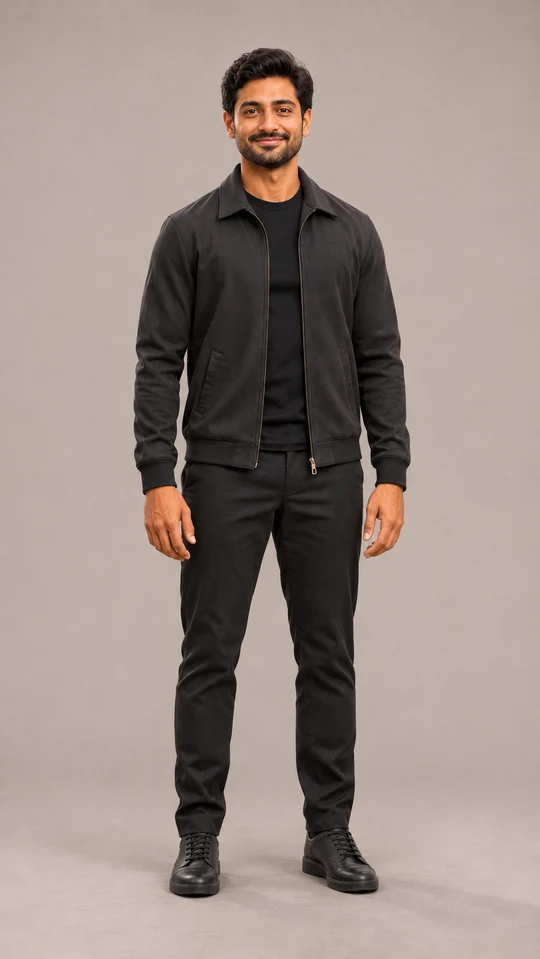 Fictional input photo
 Transformation example
Full scene reference with fictional example cast. Not a generated result.
Requested output ratio: 3:4
Become Sheru
Fictional input and transformation example. Your own result is created from your uploaded photo.
The transformed character sits cross-legged on the green and gold throne, combining a white lion head with the fictional input person's black outfit and human hands.
Scene reference, not a generated result
Use your photo as the human face reference and stand beside a separate lion character.
Choose this castUse your build and pose as a reference for a lion transformation. This changes the face into a lion.
Choose this castCreate a lion portrait or story without uploading a personal photo.
Choose this castThese scene briefs describe the composition to create. Choose your casting separately.
A street portrait alongside Sheru, or a single lion hero, with clear faces and space around the subjects.
Use a clear face photo for a companion portrait, or a standing pose for a transformation.
Create this photoA standing arrival portrait beside a parked luxury car, with Sheru adjusting his cuff.
Choose your cast and a standing photo. Keep the parked car visible behind the subjects.
Create this photoA standing royal portrait beside a golden throne in a palace, with space around the mane and hands.
Use a standing pose for a transformation, or choose Only Sheru without a personal photo.
Create this photoAn auction portrait with Sheru’s hand already raised, a rival holding a paddle and the auction item visible.
Choose the auction item and a bidding gesture. Standard video uses music and visual reactions.
Create this photoA standing portrait inside a private jet cabin, beside a window, with a glass held near the waist.
Choose a standing photo and keep the window, glass and hands visible. The scene stays inside the cabin.
Create this photoA standing birthday portrait beside a table with the cake already in place, balloons and warm lights.
Add the recipient’s name and one short greeting. Keep the cake on the table and hands clear of the frosting.
Create this photoPick the composition first. Choose Me & Sheru, Become Sheru or Only Sheru.
Use one well-lit photo with a clear face or pose. Only Sheru needs no personal photo. Add an optional scene reference and describe any details.
Choose aspect ratio and image count in More settings. Review the credit quote before generating, then compare your results.
Copying prompts and exploring scenes do not spend generation credits. Check the quote for your selected settings before submitting a task.
View pricingIn the editor, select your favorite generated image and choose Animate this image. It becomes the video’s first frame with the same scene and cast. If you change the scene, the editor asks you to release that frame first.
Explore video scenesUse these editable templates as starting points. Replace the example details and review your scene, cast and sound settings before generating.
Upload a clear photo of yourself. Keep the human and the lion as two separate characters.
Change: street setting, outfit color and time of day.
Keep the uploaded person’s face and place them beside a separate Sheru Bhai lion character.

Sheru is an anthropomorphic white lion in an ivory suit, sunglasses and gold accessories.

A street portrait alongside Sheru, or a single lion hero, with clear faces and space around the subjects.

Keep faces, hands and key props visible. No text, logos or watermarks.Use your own photo for the human. Describe the vehicle without relying on a visible brand logo.
Change: car color, clothing and hotel or street setting.
Keep the uploaded person’s face and place them beside a separate Sheru Bhai lion character.

Sheru is an anthropomorphic white lion in an ivory suit, sunglasses and gold accessories.

A standing arrival portrait beside a parked luxury car, with Sheru adjusting his cuff.

Keep faces, hands and key props visible. No text, logos or watermarks.Yes. Choose Me & Sheru and upload a clear photo of yourself. The photo provides the human reference; Sheru is a separate lion character.
Choose Only Sheru. You can describe his look and choose a scene without a personal photo.
It uses your body proportions and pose as a reference for a lion character. Choose Me & Sheru if you want the human face to remain human.
Use a sharp, well-lit photo with an unobstructed face. A visible body pose helps a transformation. Use a photo you have permission to edit, and follow the upload limits shown in the editor.
Select a generated image in the editor and choose Animate this image. The selected image becomes the video’s first frame.
The prompt library is free to read and copy. Generation uses credits; the quote depends on your selected settings. Check the editor’s quote and the pricing page before buying or generating.